Customize Your Notification Email Reports
There are several customization options available for your daily notification report, as listed in the sections below. To inquire further about these options, or to customize your daily notifications, please contact us.
Order of the Email
By default, your notifications follow the standard formatting listed here. However, these sections can be re-arranged to suit your needs, or completely removed if they're irrelevant. For example, we can push the Trademark Data Review section to the bottom of the report, or remove it entirely if you'd prefer to review these matters in the docket.
Adding/Removing Data
The default email will give you basic identifying information for each matter included, typically mark name, application/registration number, and the jurisdiction it was filed in. We can include any number of fields that would be helpful, such as:
Owner name
Representative/Attorney of Record
Custom docket tags
Assigned Collaborators
Notification Ranges and Intervals
Unless you've requested a change in the past, the typical setting for the daily notification report is to show you entries due in the next 45 days. This can be adjusted to any preferred range (90 days in advance, 6 months in advance, etc).
It is also possible to create multiple notification intervals for the same entry. For example, the entries in your docket can be told to appear three months before they are due, but only for a week at a time. They would then drop out of your notifications until your standard 45 day setting.
Color-Coding
We can change the color of certain entries in your email to make them stand out. For example, we can make office actions and renewals a bright red. The options are endless with color-coding, so let us know what you'd like to see!
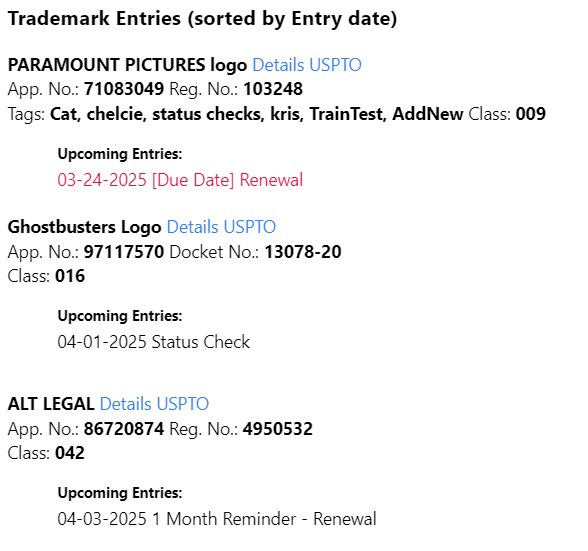
Table Format
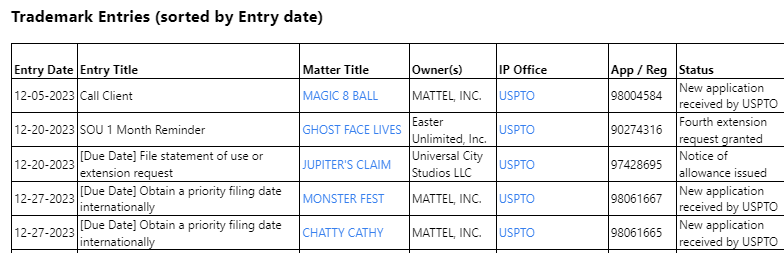
By request, your daily docketing email can be switched over to a table-based format. Each matter type will still be separated into its own section, with the deadlines being presented in a condensed table rather than a list. The columns included can also be rearranged or swapped out with different information.